 BiLingoPlus



Chrome extension · flashcards from any web page
Highlight it. Don't retype it.
The cards you never made were lost at the same step: typing them out. Highlight as you read, and by the last paragraph the deck is already made — ready to study here, send to Anki or export for Quizlet.
Free for your first 25 cards & 3 decks · unlimited for $4.99 once, not a subscription · 14-day refund
- 25 cards · 3 decksfree, with every feature
- $4.99 oncePro is unlimited — not a subscription
- One click into Ankivia the free AnkiConnect add-on
- On your deviceno account, no copy on our servers
Why the flashcards you meant to make never get made
Reading is where you find what is worth remembering. The dangerous place is the step after it — getting that sentence into a card. Each usual way of making flashcards from a web page stalls there.
Retype it by hand
Copy the sentence, switch to your flashcard app, paste it into the front, type the answer, go back to the article — once for every card.
the second tab. Halfway down a good article, the card waits for “later”, and never gets made.
Build a file and import it
Collect the cards in a text file, one per line, the same separator everywhere, saved as UTF-8 — then match up separator, note type, deck and fields on Anki's import screen.
the import screen. If everything lands in the Front field, the separator was wrong.
Let an AI write them
Paste in a page and a generator writes the cards for you. Fast — and you did not choose a single one of them.
the pile. You end up sorting and trusting a machine-made stack of cards.
Cardwright keeps the part only you can do — deciding what is worth remembering — and removes the typing. The sentence you highlight is already in the card. See how it works ↓
How to make flashcards from a web page in three steps
You highlighted. That was the whole job. No copy-paste, no second tab — all in your browser.
Highlight and click the icon
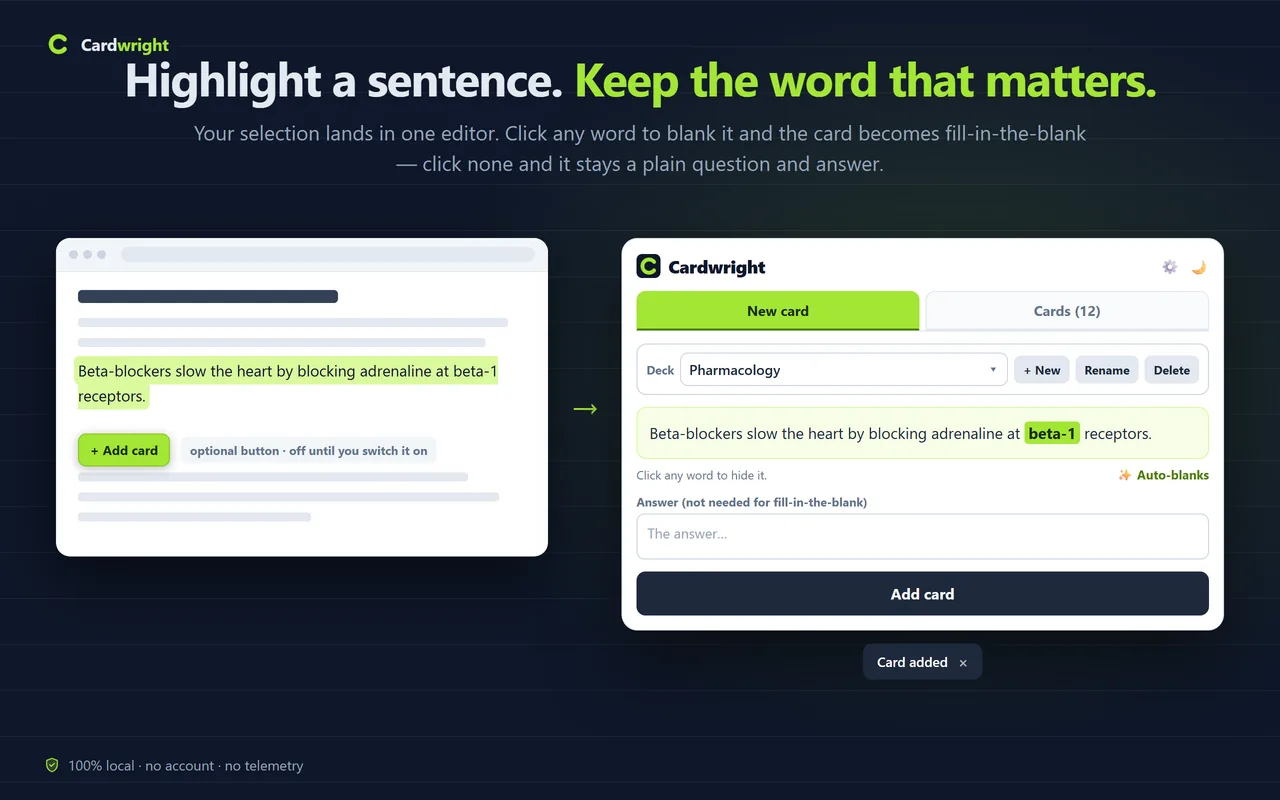
On an article or any regular web page, highlight the sentence you want to remember and click the Cardwright icon. The text is already in the card editor. Prefer to stay on the page? Switch on the optional + Add card button.
Make it a question or a blank
Type an answer for a question-and-answer card, or click words to blank them out for a fill-in-the-blank card. Pick the deck and click Add card.
Study it — here or in Anki
Click Start review in the popup, flip the card and rate it with Again or Good — Cardwright decides when to show it next. Or send the whole deck to Anki, or export it for Quizlet.
A flashcard maker in Chrome that works with Anki and Quizlet
Every feature below is in the free plan. Pro only lifts the 25-card, 3-deck limit.
Question-and-answer cards
The selection becomes the front; type the answer in Back. The card is saved in the wording you chose — no copying, no tidying up afterwards.
Fill-in-the-blank (cloze) cards
Click the words to hide; the hidden words are the answer. ✨ Auto-blanks suggests blanks for numbers, capitalised terms and quoted phrases — you keep the final say.
Review right in the popup
Flip a card and rate how it went; Cardwright decides when to show it again, so ten spare minutes actually move something. Stats show your day streak, 7-day accuracy and tough cards.
Send to Anki in one click
With the Anki app open and the free AnkiConnect add-on installed, a whole deck goes in at once — into a deck of the same name, tagged cardwright, with cards already there skipped.
Anki and Quizlet export
Export · Anki downloads a .tsv file whose header lines already name the note type and deck. Export · Quizlet downloads text and copies it to your clipboard — one deck at a time; export all decks at once to get the files.
Stored on your device
No account. Cards live in your browser, and Cardwright reads a page only when you click its icon or its optional + Add card button. Backup and Restore move your decks and review progress to another computer.
One highlight, three places to study it
The same sentence, followed from the page to the card to wherever you study — with the labels you will actually see.
On the page
…the cycle's enzymes sit inside the organelle. The Krebs cycle takes place in the mitochondrial matrix. Its products then feed…
In Cardwright
Answer: mitochondrial matrix
Back: In the mitochondrial matrix
Where you study
#separator:TabFree for 25 cards. $4.99 once for unlimited.
The free plan is the whole app — every feature, up to 25 cards and 3 decks, which is roughly one good article. When your reading outgrows that, $4.99 once removes the cap for good, on every computer you use. Cards you have already made are never locked.
- Cover a whole course, not the first 25 cards — 25 cards is one article; a term is hundreds
- A deck per subject, course or exam — unlimited decks, so nothing gets dumped into Misc
- Unlock Pro on every computer you use — the same key works on each of them
- Buy once, keep it for good — no renewal; works offline between weekly key checks
- Every feature — nothing crippled
- Q&A and fill-in-the-blank cards, Auto-blanks & study stats
- Built-in review
- Send to Anki + Anki/Quizlet export — one deck or all at once
- Cards you sent to Anki stop counting toward the 25
- Rename and delete decks, backup, restore & dark theme
- Cards you already made are never locked
Questions about Cardwright
Anki, file imports, storage, Pro and refunds.
Do I need the Anki app?
No. Cardwright works fully on its own — capture, study, and export. If you do use Anki, you get two extras: one-click “Send to Anki” (when the Anki app is open, via the free AnkiConnect add-on), or a downloadable file that imports without any field-mapping.
Can I make fill-in-the-blank (cloze) cards?
Yes. After you highlight a sentence, click the words you want to hide — the hidden words are the answer, so the card needs no separate Back. ✨ Auto-blanks suggests blanks for numbers, capitalised terms and quoted phrases, and you can click any word to change them. Send to Anki adds these cards with the “Cardwright Cloze” note type; in a Quizlet export each blank becomes its own card.
How do I import my cards into Anki or Quizlet as a file?
On the Cards tab, Export · Anki downloads a .tsv file: in the Anki desktop app choose File → Import and pick it. The file already names the note type and the deck; if that deck doesn’t exist in Anki yet, pick or create it on the import screen. Export · Quizlet downloads a .txt file and also copies the cards to your clipboard: in Quizlet choose Create set → Import and paste. Step by step: how to import text into Anki.
Where are my cards stored?
Only on your device, in the browser's local storage. There's no account and no server of ours holding your notes. You can back everything up to a file and restore it, so a reinstall never loses your cards or your review progress. Because nothing goes to a server, decks live in the Chrome profile that made them — they don't sync between computers. The backup file is the way to move them: back up on one machine, restore on the other.
What does Pro add, and is it a subscription?
Pro is a one-time $4.99 purchase (no subscription) that removes the free limit — unlimited cards and decks. Everything else, including Auto-blanks and study stats, is already free. The free tier is capped at 25 cards and 3 decks, but the cap only affects making new cards: you can always review, export, and back up everything you've already created. Cards you have sent to Anki with Send to Anki no longer count toward the 25.
How do I get Pro after paying?
Checkout is handled by Paddle and takes about a minute. Right after payment you land on a page showing your license key — copy it there. Then open Cardwright and click Get Pro at the top of the popup (or ⚙ → Pro). If the Pro screen with a License key box opens, paste the key and click Activate: it unlocks on the spot. If a checkout page opens instead, close it — don't pay twice: your copy is version 1.0.1, where the key box appears only when you try to add a 26th card or a 4th deck. Chrome installs the fixed version automatically once it is out, or email info@bilingoplus.com with your order number and we'll activate it with you. The same key unlocks Pro on your other computers, and Cardwright re-checks it about once a week, working offline in between. Lost the key? Email info@bilingoplus.com and we'll resend it.
How do refunds work?
Purchases are handled by Paddle, our reseller (Merchant of Record). You can request a refund within 14 days of your purchase, for any reason — email info@bilingoplus.com or use the links in your Paddle receipt.
Does it work in Google Docs or PDFs?
PDFs and Chrome's own pages (settings, the Web Store) are off-limits to every extension — Chrome blocks reading text there. Editors that draw their text on a canvas, Google Docs among them, also don't hand over a normal text selection. In all of those cases, copy the text and paste it into the card's Front field. Normal articles and web pages — where most reading happens — capture with one click.
Why not just use an AI flashcard generator?
Different job. AI tools write cards for you — fast, but you end up sorting and trusting a machine-made pile. Cardwright keeps you in control: you decide what's worth remembering, and it removes the busywork of typing and formatting. Auto-blanks is an optional assist that suggests blanks for numbers, capitalised terms and quoted phrases in a Cloze card — you keep the final say. The result is cards you actually chose to make. And it's 100% local, with no account.
Guides: Anki imports, AnkiConnect and help
Step-by-step answers for the moments a flashcard workflow gets stuck.
How to import text, CSV or TSV into Anki
File format, header lines, the import screen, the all-in-Front-field fix — plus Quizlet import.
Read the guide → GUIDEAnkiConnect not working? Fixes that work
Anki open, a restart after install, port 8765, webCorsOriginList, App Nap and the firewall.
Read the guide → HELPCardwright help
Making cards, Send to Anki, exports, backups, the free limit and Pro.
Open help → CHANGELOGWhat changed in Cardwright
Versions and what each one changed.
Open changelog →Make the cards while you are still reading
Add Cardwright to Chrome, highlight your next sentence, and the deck starts there. Free for your first 25 cards and 3 decks; $4.99 once when you want more.